If you have tried to git clone a big repository or docker pull an image from mainland China, you know the feeling: it hangs, it crawls, or it dies with a timeout. The Great Firewall blocks some developer services outright and slows others down until they are barely usable.
This guide covers the three fixes developers actually use: domestic mirrors for package managers, a proxy setting for each tool, and a VPN for the whole machine. We ran the proxy commands on Ubuntu 24.04 and show you the real output.
Table of Contents
What works from mainland China, and what doesn’t
This changes by city, ISP and even month, so treat it as a rough map rather than a guarantee:
| Service | From mainland China | Usual fix |
|---|---|---|
| github.com | Usually loads, but slow; large clones often drop | Proxy or VPN |
raw.githubusercontent.com |
Often unreachable, which breaks many install scripts | Proxy or VPN |
| Docker Hub | Blocked since mid-2024 | Proxy or VPN |
| npm registry | Works, but slow | Mirror |
| PyPI | Works, but slow | Mirror |
Go module proxy (proxy.golang.org) |
Blocked | Mirror |
| Hugging Face | Blocked | Mirror |
| Google (search, Gmail, Cloud console) | Blocked | VPN |
Mirrors are run by Chinese companies, universities and communities. They are fast inside China, but they only cover package downloads.
Option 1: Use mirrors for package managers
The quickest fix for npm, pip, Go and Hugging Face, with no proxy and no VPN. These are the mirrors most developers in China use.
npm
npm config set registry https://registry.npmmirror.com
To switch back to the official registry later: npm config delete registry
pip
pip config set global.index-url https://pypi.tuna.tsinghua.edu.cn/simple
Or just for one install: pip install -i https://pypi.tuna.tsinghua.edu.cn/simple requests. To undo the permanent setting: pip config unset global.index-url
Go
go env -w GOPROXY=https://goproxy.cn,direct
Undo with go env -u GOPROXY.
Hugging Face
export HF_ENDPOINT=https://hf-mirror.com
The huggingface_hub library and huggingface-cli read this variable, so model downloads go to the mirror. Add the line to ~/.bashrc to keep it.
git push, documentation sites or anything else that isn’t a package download. They can also lag behind: if a version released an hour ago is missing, that is why. Docker Hub mirrors used to cover docker pull, but most public ones in China shut down in mid-2024, so for Docker you need option 2 or 3.Option 2: Send each tool through a local proxy
If you run a proxy client (Clash, v2rayN, sing-box and similar), it opens a local port for HTTP and SOCKS5 connections, often both on the same “mixed” port. We use 127.0.0.1:7890 below; your client’s settings show yours.
Here is all of it working through a proxy on Ubuntu 24.04. We also checked the proxy’s log to make sure every connection really went through it:
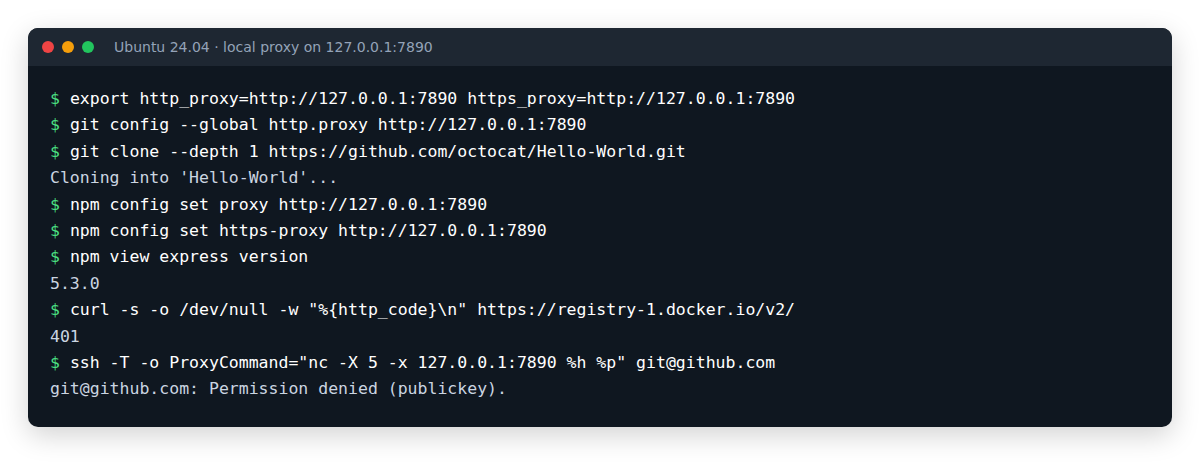
The 401 from Docker Hub is good news: it is Docker Hub itself answering “log in first”, which means the request got through. Here is each setting on its own.
Your shell: curl, wget and most command-line tools
export http_proxy=http://127.0.0.1:7890 https_proxy=http://127.0.0.1:7890 no_proxy=localhost,127.0.0.1
Add the line to ~/.bashrc (or ~/.zshrc) to make it permanent.
git over HTTPS
git config --global http.proxy http://127.0.0.1:7890
If you only want GitHub to go through the proxy:
git config --global http.https://github.com.proxy http://127.0.0.1:7890
To undo: git config --global --unset http.proxy
git over SSH
Remote URLs like [email protected]:user/repo.git use SSH, which ignores the settings above. Add this to ~/.ssh/config:
Host github.com
    ProxyCommand nc -X 5 -x 127.0.0.1:7890 %h %p
nc here is OpenBSD netcat, the default on Ubuntu and Debian. Then test it:
ssh -T [email protected]
With your key loaded, GitHub answers with “Hi username! You’ve successfully authenticated”. Our test machine had no GitHub key, so it got Permission denied (publickey), which still shows the connection reached GitHub.
npm
npm config set proxy http://127.0.0.1:7890
npm config set https-proxy http://127.0.0.1:7890
pip
pip install --proxy http://127.0.0.1:7890 requests
Or for every install: pip config set global.proxy http://127.0.0.1:7890
Docker (docker pull)
docker pull is done by the Docker daemon, not by your shell, so exporting variables in your terminal does nothing for it. Give the daemon its own proxy with a systemd drop-in:
sudo mkdir -p /etc/systemd/system/docker.service.d
[Service]
Environment="HTTP_PROXY=http://127.0.0.1:7890"
Environment="HTTPS_PROXY=http://127.0.0.1:7890"
Environment="NO_PROXY=localhost,127.0.0.1"
sudo systemctl daemon-reload
sudo systemctl restart docker
Check that the daemon picked it up with sudo systemctl show --property=Environment docker.
apt
Acquire::http::Proxy "http://127.0.0.1:7890";
Acquire::https::Proxy "http://127.0.0.1:7890";
Option 3: A VPN for the whole machine
A proxy only covers the tools you configure. The extension store in your editor, a build that calls out to a dozen hosts, the Docker daemon, the browser tab with the docs: a VPN covers all of them, with nothing to configure.
The catch in China is which VPN. Classic protocols such as OpenVPN and WireGuard have recognisable traffic patterns, and the firewall blocks them quickly. What gets through are stealth protocols:
- VLESS + Reality looks like an ordinary HTTPS connection to a real, popular website.
- Hysteria2 runs over QUIC (UDP) and keeps its speed on lossy, long-distance links. In this benchmark, on a deliberately bad test network with 1% packet loss, it was about 35 times faster than TCP-based protocols; on a clean connection all three ran at about 300 Mbps.
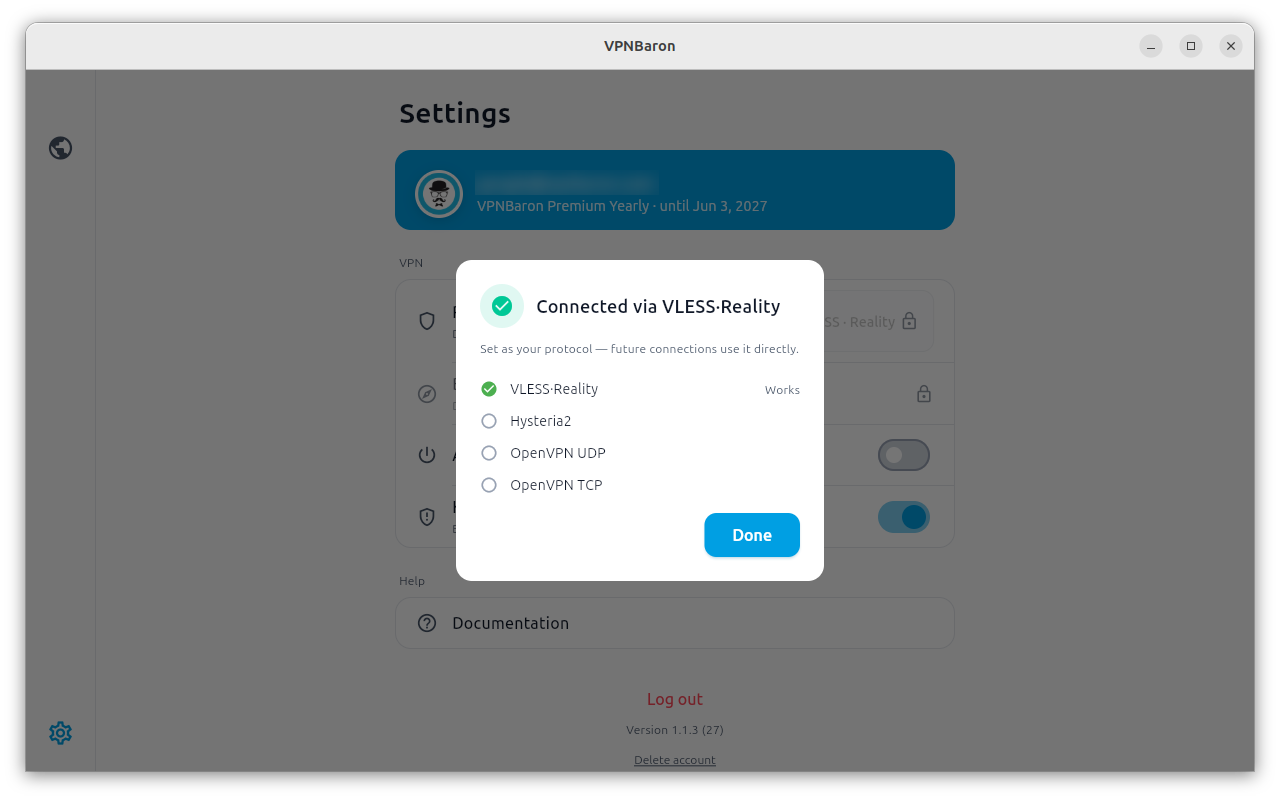
VPNBaron has both, plus OpenVPN, on every location, with apps for Windows, macOS and Linux. Its Baron Pathfinder tests which protocol gets through on the network you are on and keeps the one that works:
On a Linux dev box or server
On Linux, the app comes with a command-line client, which is handy for a dev box or a cloud server inside China. The full walkthrough is in How to Install a VPN on Ubuntu 24.04 and Debian 13; the short version:
curl -fsSL https://vpnbaron.com/download/linux/install.sh | sh
vpnbaron login
sudo vpnbaron connect hk1 -p vless
hk1, jp1, kr1 and sg1 (Hong Kong, Tokyo, Seoul and Singapore) are the shortest paths out of the mainland. vpnbaron servers lists every location:
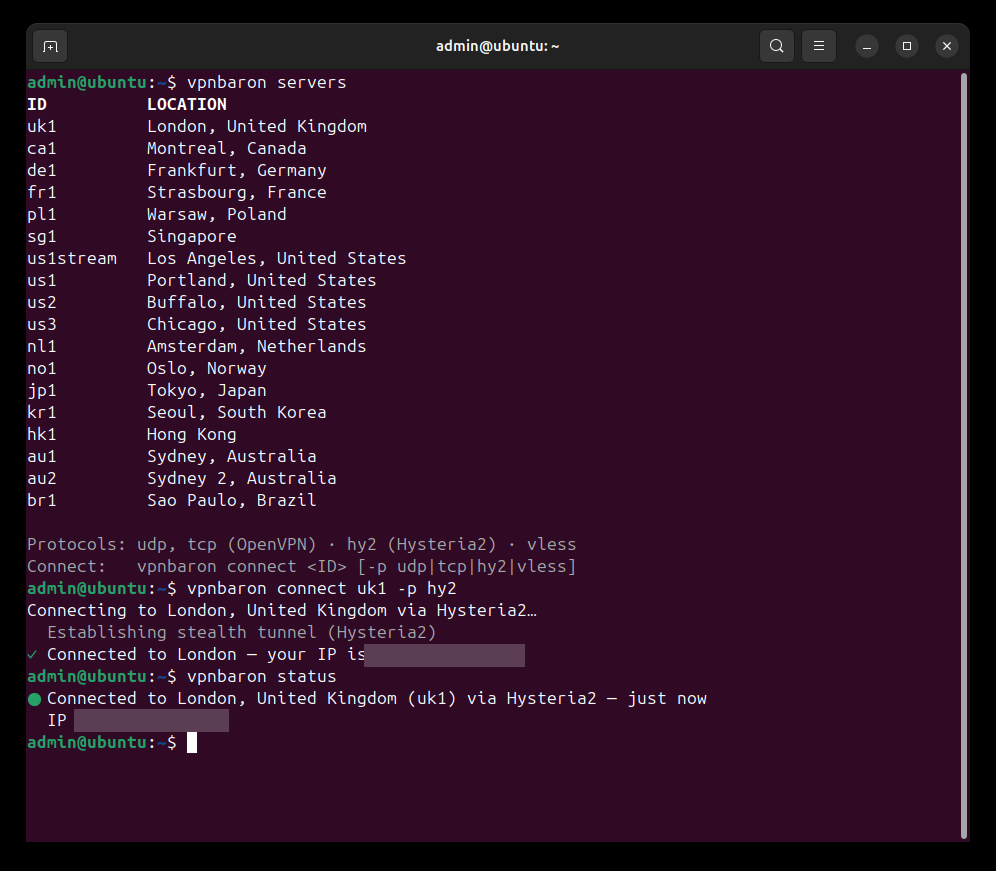
-p udp or -p tcp) sends the SSH replies through the VPN too and freezes the session, unless you add the routing rules from the VPNBaron CLI docs first.Set it up before you travel
- Install the app and sign in before you enter the mainland. vpnbaron.com itself is blocked in China, so the normal sign-in, which opens the website, won’t work there. If you have to sign in again in China, use Sign in with an email code: the app requests a one-time code (OTP) through a separate route built for censored networks and never opens the website.
vpnbaron loginin the CLI always works this way. The code arrives by email, so use an inbox you can open in China: Gmail is blocked without the VPN, while Outlook usually works. - Connect once and check that it works, so the app already has its server list when you arrive.
- Keep a second way in: import your stealth subscription link into a client such as Hiddify or V2Box as a backup.
- Save this checklist for offline reading, since help pages may be slow or blocked once you are across.
More on what works where: VPN for China.
Which option should you pick?
- Only installing packages? Mirrors. Free, fast, two minutes to set up.
- Already running a proxy client? Point git, npm, Docker and apt at it as shown above.
- Want everything to just work, or working on a server? A VPN with stealth protocols.
One tip if you combine them: with a VPN on, switch the mirrors back to the official registries. Leaving China through the VPN and coming back in to reach a Chinese mirror is usually slower than going straight to the official registry.
FAQ
Is GitHub blocked in China?
Not officially. github.com usually loads, but it is often slow, big clones drop, and raw.githubusercontent.com, which many install scripts use, is often unreachable. A proxy or a VPN fixes all three.
Why does docker pull time out in China?
Docker Hub has been blocked since mid-2024, and most public mirrors closed around the same time. Give the Docker daemon a proxy (it ignores your shell’s variables) or use a VPN.
Do I still need a VPN if I use mirrors?
For package installs, no. For GitHub, Docker Hub, git push, Google and most documentation sites, yes.
Conclusion
Mirrors are the quick win for package managers, a local proxy covers the tools you configure, and a stealth VPN covers everything else, including the Docker daemon and your browser. If you work from China regularly, set up all three before you need them. Questions or a mirror we missed? Let us know in the comments.