Firewalls in offices, hotels and whole countries don’t need to break a VPN’s encryption to block it. They only need to recognise it. So we captured four VPN protocols on Linux, opened the captures in tshark (Wireshark’s command-line version), ran them through nDPI, an open-source DPI engine, and compared their TLS fingerprints with Chrome’s. Here is exactly what gives each one away.
Table of Contents
What DPI can see in encrypted traffic
- The first bytes. Many protocols announce themselves in their very first packet.
- The TLS Client Hello. It is sent before encryption starts, so the site name (SNI), the ALPN list and the cipher suites are readable. Together they form a fingerprint, usually written as JA3 or the newer JA4.
- Active probing. The firewall connects to the suspicious server itself and looks at what answers.
- Behaviour. Packet sizes, timing, how long connections live. We did not test this part; more on that at the end.
The lab
Everything ran on an Ubuntu 24.04 machine. The VPN clients ran inside a network namespace that could only reach a relay on 10.200.0.1, which forwarded to a VPNBaron server in Frankfurt. We captured on the namespace’s interface, so the captures contain only lab traffic and lab addresses:
sudo ip netns exec hytest tcpdump -i vn0 -U -w openvpn-udp.pcap 'host 10.200.0.1'
- Analysis: tshark 4.2.2 and nDPI 4.2, the versions Ubuntu 24.04 ships
- Clients: OpenVPN 2.6 (UDP and TCP), and sing-box 1.14.3 for Trojan, VLESS Reality and Hysteria2
- For comparison: Chrome 153 (Chrome for Testing) visiting the same website the Reality server borrows, and google.com over QUIC
The OpenVPN client used a deliberately wrong password: it got through the handshake and was turned away at login, which is everything a firewall needs to see. In the output below we replaced the server’s domain name and the borrowed website’s name with placeholders; nothing else is changed.
OpenVPN: identified by its first byte
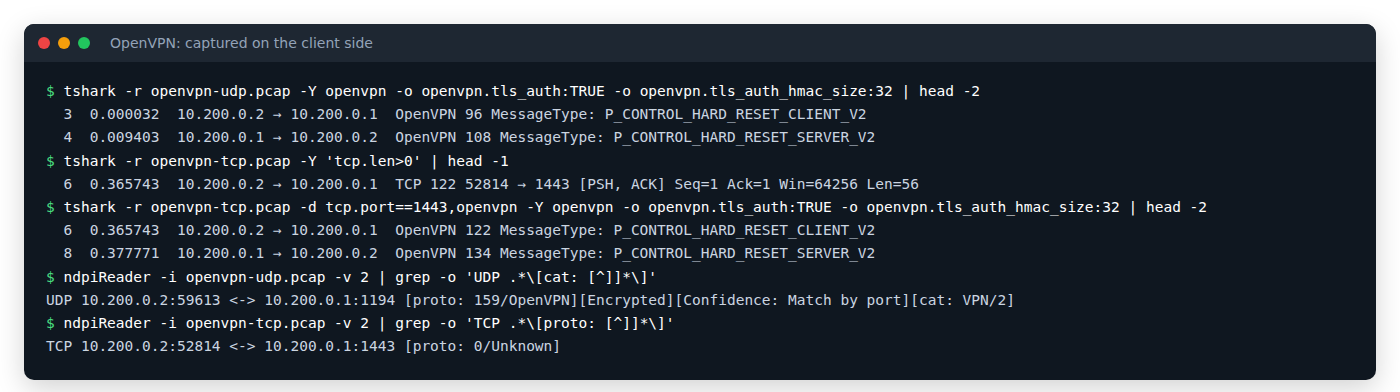
Wireshark labels the very first packet P_CONTROL_HARD_RESET_CLIENT_V2. In raw bytes, the UDP payload starts with 0x38: opcode 7 (“hard reset, version 2”) shifted left three bits, plus key ID 0. Over TCP it is the same byte after a two-byte length. No decryption is needed. The tls-auth HMAC our config uses stops tampering, but it doesn’t hide this header, and right after it OpenVPN runs its own TLS handshake inside its control channel, which is a second signature.
Two details from our run are worth knowing. Wireshark only decodes OpenVPN on port 1194 out of the box: on TCP port 1443 it showed plain TCP until we told it to treat the port as OpenVPN with -d tcp.port==1443,openvpn. And nDPI 4.2, a 2022 release, labelled the UDP flow OpenVPN only because of the port (Confidence: Match by port) and called the TCP flow Unknown. Newer nDPI releases and commercial DPI do better. Still, the header looks the same in every OpenVPN connection, which makes it one of the easiest protocols to fingerprint, and it’s usually the first thing VPN-hostile networks block.
Trojan: HTTPS, but not from a browser
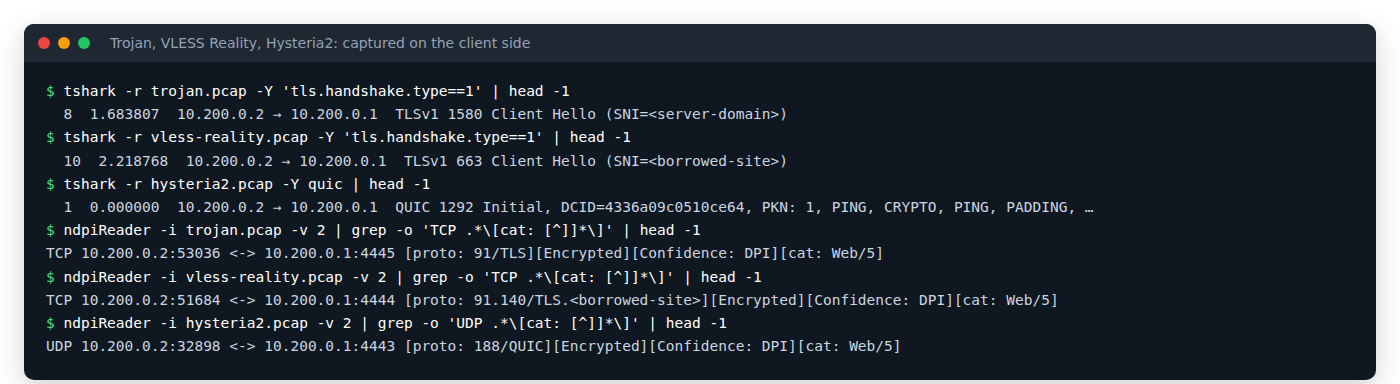
Trojan wraps everything in TLS. tshark sees an ordinary TLS Client Hello and nDPI calls it TLS, category Web. The site name (SNI) is the VPN server’s own domain.
The giveaway is the fingerprint. Our client sent a JA4 of t13d131100_…: 13 cipher suites, 11 extensions and no ALPN at all (00). That is the default fingerprint of Go’s TLS library. Browsers always send ALPN (h2, http/1.1), so a firewall with a list of browser fingerprints can flag this. Trojan clients that support uTLS can borrow a browser’s fingerprint; ours, like many, didn’t use it. It’s one reason Trojan is the legacy option today.
VLESS Reality: Chrome visiting a big website
tshark sees a TLS Client Hello whose SNI is a very large, well-known website, not ours. nDPI goes a step further and labels the flow as traffic to that website (TLS.<borrowed-site>, category Web).
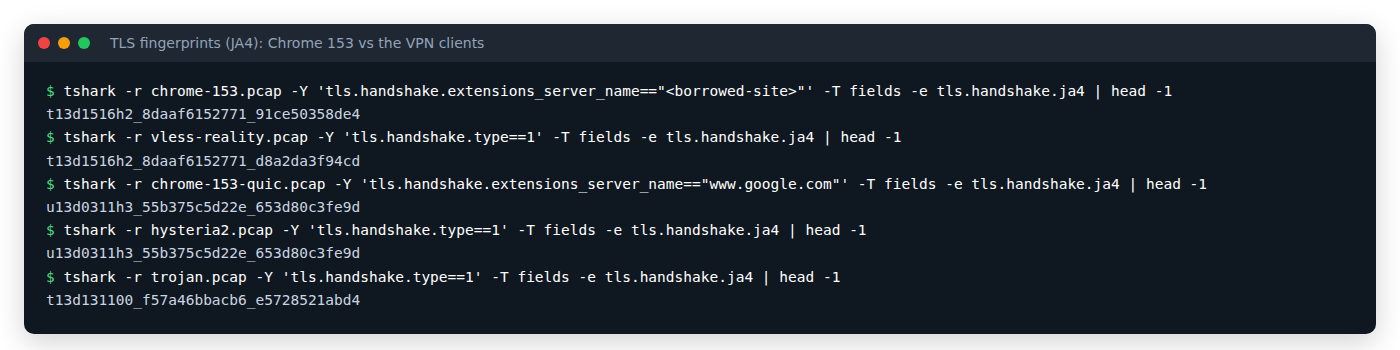
The fingerprint is the interesting part. VLESS Reality’s JA4 starts with t13d1516h2_8daaf6152771, exactly like Chrome 153 visiting the same site: same TLS version, the same 15 cipher suites, the same 16 extensions, the same ALPN. In the raw JA4 the cipher and extension lists are identical. Only the last part differs, because it includes the signature algorithms: Chrome 153 adds new post-quantum (ML-DSA) algorithms that the client’s Chrome profile doesn’t have yet. The fingerprint matches Chrome, just a slightly older one.
JA3 is no help here either: both Chrome and the Reality client shuffle their extensions, so their JA3 hash changes on every connection.
What a firewall sees when it probes the server
Some firewalls connect to suspicious servers themselves. We did the same with openssl, pretending to visit the borrowed website:
openssl s_client -connect 10.200.0.1:4444 -servername <borrowed-site>
subject=businessCategory = Private Organization, …, O = <company>, CN = <borrowed-site>
New, TLSv1.3, Cipher is TLS_AES_256_GCM_SHA384
Verify return code: 0 (ok)
The Reality server passed the probe straight through to the real website: we got that site’s real certificate, issued by its real certificate authority, and OpenSSL verified it. With a made-up site name we got the same real certificate. To a prober, the server is just a route to a big website.
Its weak spot, as researchers point out, is that the site name belongs to a big company while the server’s IP address doesn’t. A firewall that compares the two can get suspicious, which is why the choice of borrowed site matters, and why it helps to have a second protocol.
Hysteria2: HTTP/3 with Chrome’s fingerprint
Hysteria2 runs over QUIC. tshark shows a QUIC version 1 Initial packet with ALPN h3, which is exactly what HTTP/3 looks like, and nDPI says QUIC, category Web.
The surprise was the fingerprint: u13d0311h3_55b375c5d22e_653d80c3fe9d was identical to Chrome 153’s own QUIC handshake with google.com. Same cipher suites, the same 11 extensions (including ALPS and ECH, which few clients other than browsers send) and the same signature algorithms. (Wireshark 4.2 prints QUIC fingerprints with a u prefix.)
Two caveats. QUIC’s first packets are encrypted with keys anyone can derive, which is how Wireshark reads the handshake, so the site name is visible here too; in our case it was the server’s own domain. And because QUIC runs over UDP, a network that blocks or throttles UDP stops Hysteria2 no matter how much it looks like a browser.
Side by side
| Protocol | First packet | nDPI 4.2 says | Fingerprint | Weak spot |
|---|---|---|---|---|
| OpenVPN (UDP 1194) | OpenVPN hard reset, first byte 0x38 |
OpenVPN, category VPN (by port) | Not needed | Same header in every connection |
| OpenVPN (TCP 1443) | Same header after a 2-byte length | Unknown | Not needed | Same, on any port |
| Trojan | TLS Client Hello, the server’s own domain | TLS, Web | Go’s TLS library, no ALPN | Not a browser fingerprint |
| VLESS Reality | TLS Client Hello, a big website’s name | TLS to that website, Web | Chrome, minus the newest signature algorithms | Site name vs IP owner |
| Hysteria2 | QUIC Initial, ALPN h3 |
QUIC, Web | Identical to Chrome 153’s QUIC | Needs UDP |
What this means if your network blocks VPNs
- Classic VPN protocols are easy to recognise, and moving OpenVPN to another port doesn’t hide its header.
- Protocols that copy browser traffic are far harder to single out: VLESS Reality on TCP 443 and Hysteria2 over QUIC.
- Keep both. Where UDP is blocked, Reality gets through; where Reality is slow or interfered with, Hysteria2 is the fallback.
- What we didn’t test: traffic behaviour over time, and real national firewalls. DPI keeps improving, and no protocol stays invisible forever.
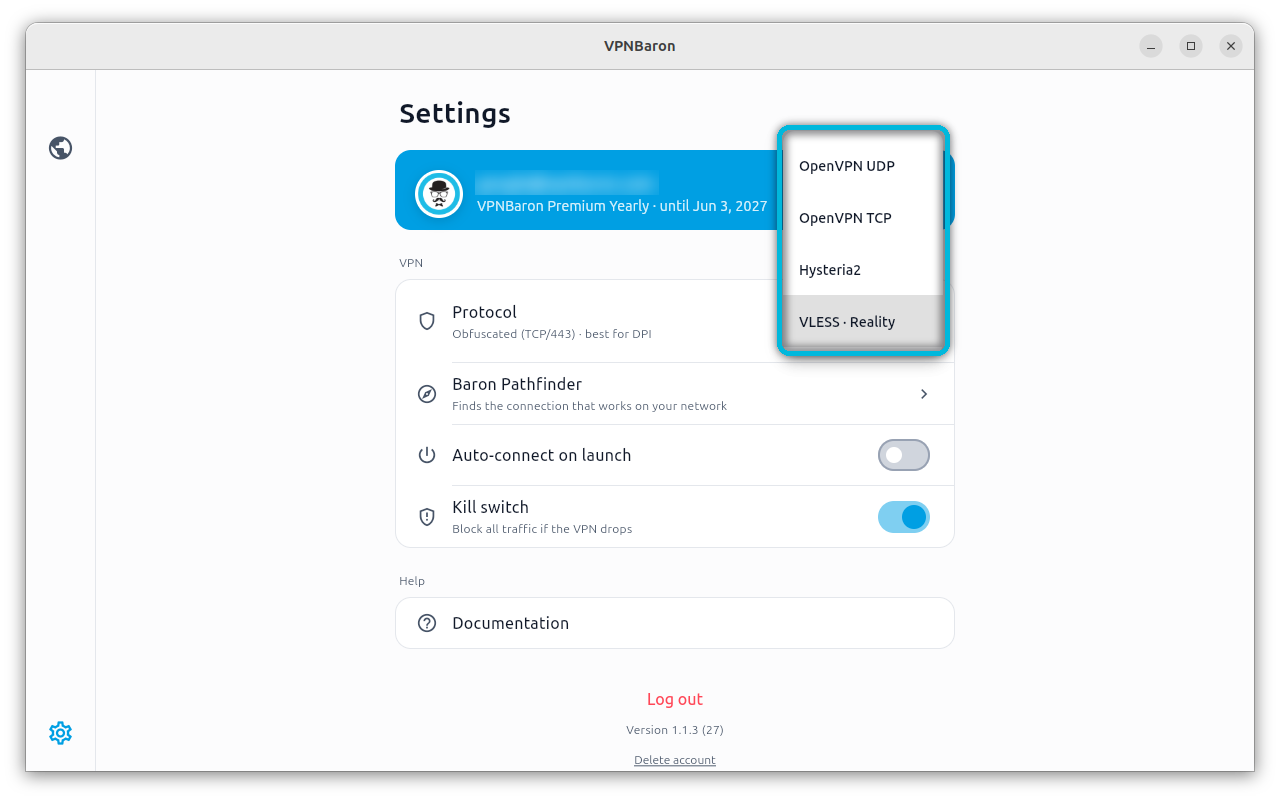
If you’d rather not pick by hand, VPNBaron has VLESS Reality and Hysteria2 next to OpenVPN on every location, and its Baron Pathfinder tests which one gets through on the network you are on:
On Linux it installs with one command and also works from the terminal: see How to Install a VPN on Ubuntu 24.04 and Debian 13. Working from mainland China? This developer guide covers GitHub, Docker Hub, npm and pip there.
Try it yourself
Both tools are in Ubuntu’s repositories:
sudo apt install tshark libndpi-bin
Capture while your VPN client connects, then look at the first packets, the Client Hello and its fingerprint:
sudo tcpdump -i any -w vpn.pcap 'port 443 or port 1194'
tshark -r vpn.pcap -Y 'tls.handshake.type==1' -T fields -e tls.handshake.extensions_server_name -e tls.handshake.ja4
ndpiReader -i vpn.pcap -v 2
If your OpenVPN config uses tls-auth with SHA256, add -o openvpn.tls_auth:TRUE -o openvpn.tls_auth_hmac_size:32 to tshark so it decodes the packets cleanly. And capture with the full packet size (tcpdump’s default): Chrome’s Client Hello is now about 1,800 bytes because of its post-quantum key share, and a 1,500-byte snap length cuts it off.
FAQ
Can DPI see which websites I visit through a VPN?
No. What happens inside the tunnel is encrypted. DPI sees the outer connection: the VPN server, or with Reality, the name of the website it borrows.
Does running OpenVPN on port 443 hide it?
No. The port changes, but the OpenVPN header in the first packet doesn’t, and that header is what DPI matches.
Is VLESS Reality undetectable?
Not undetectable, but in our test it was the hardest of the four to tell apart from ordinary browsing: Chrome’s fingerprint, a real website’s certificate when probed, and nDPI filing it under that website. Its main weak spot is the mismatch between the site name and the server’s IP address.
Conclusion
A VPN doesn’t have to be decrypted to be blocked: OpenVPN gives itself away in its first byte, and Trojan in its non-browser fingerprint. VLESS Reality and Hysteria2 hold up much better because they copy what Chrome does, down to the fingerprint. If your network blocks VPNs, use one of those two, ideally with both available. Spotted something different in your own captures? Tell us in the comments.


![$ fd [options]](https://bytexd.com/wp-content/uploads/2022/06/How-to-Use-the-fd-Command-in-Linux-‘find-Alternative-380x220.png "How to Use the fd Command in Linux ('find' Alternative) 15")